Greatest View: The Bold, Cartoon-Like Display Font That Can Transform Your Designs
If you're looking for a display font that commands attention and brings a playful yet powerful vibe to your designs, Greatest View might just be the one. This bold, cartoon-like typeface is perfect for headlines, logos, and eye-catching visuals. But before you jump in and start using it everywhere, there are some important things to consider to make sure it works well for your project.
What Is Greatest View?
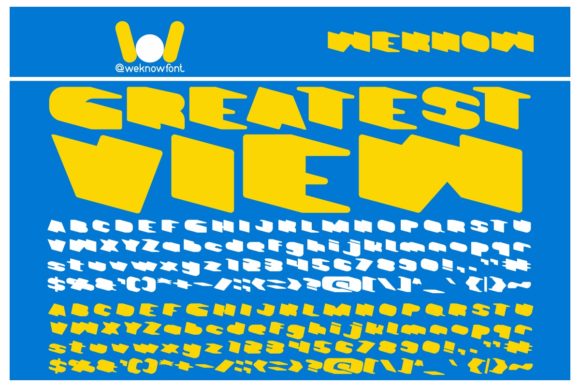
Greatest View is a display font known for its chunky, exaggerated letterforms and a whimsical, almost cartoonish appearance. It’s designed to stand out and draw the eye, making it ideal for use in creative projects where impact matters more than readability. However, this doesn’t mean it should be used in every context.
The font’s unique style makes it particularly popular among graphic designers, illustrators, and content creators who want to add a touch of fun or energy to their work. Its thick strokes and rounded edges give it a friendly and approachable feel, which can be great for branding, posters, and social media graphics.
Common Mistakes When Using Greatest View
While Greatest View is visually appealing, many users make mistakes when incorporating it into their designs. These errors can affect the overall look, usability, and effectiveness of the final product.
Mistake 1: Using It for Body Text
One of the most common mistakes is using Greatest View as body text. Because it's a display font, it lacks the legibility needed for long paragraphs. Reading large blocks of text in this font can be tiring and confusing for the audience.
Better Approach: Reserve Greatest View for headlines, titles, or short phrases. For body text, choose a more readable sans-serif or serif font like Arial, Helvetica, or Georgia.
Mistake 2: Overusing It in a Design
Another mistake is applying Greatest View too frequently within a single design. Using it for multiple headings, buttons, and icons can create visual clutter and reduce the impact of each element.
Better Approach: Use Greatest View sparingly. Limit it to one or two key elements per design to maintain balance and focus. Let it be the star of the show rather than part of the background noise.
Mistake 3: Ignoring Color Contrast
Because Greatest View has such thick strokes, it’s crucial to ensure that the color contrast between the text and background is high enough for readability. A poorly chosen color combination can make the font look muddy or unprofessional.
Better Approach: Always test your design on different screens and lighting conditions. Stick to high-contrast combinations like black on white or white on dark backgrounds. Avoid using similar shades that may cause the text to blend in.
What to Check Before Using Greatest View
Before deciding to use Greatest View in your next project, take a moment to evaluate whether it fits the purpose and tone of your content. Here are a few key factors to consider:
- Project Type: Is it for a logo, poster, website header, or something else? Make sure the font complements the overall theme.
- Audience: Who will be viewing your design? If your audience prefers a more professional look, Greatest View might not be the best choice.
- Readability: Will the text be easy to read at the intended size and distance? Test it on different devices and screen sizes.
- Licensing: Ensure you have the proper license to use Greatest View for commercial purposes if needed. Some fonts require payment or attribution.
Realistic Examples of Greatest View in Action
Let’s say you’re designing a promotional poster for a children’s party. Greatest View would be an excellent choice for the headline “Join the Fun!” because it adds a playful and vibrant feel to the message. However, if you were creating a business report, using Greatest View for the title could come off as unprofessional.
Another example is using Greatest View for a blog post’s featured image. It can help grab attention and set the tone for the content. Just be sure to pair it with a clean, readable font for the rest of the text.
Final Tips for Working With Greatest View
To get the most out of Greatest View, keep these tips in mind:
- Use it for emphasis, not for everything.
- Pair it with complementary fonts for better hierarchy and balance.
- Test it in different sizes and colors to see how it looks across platforms.
- Always consider the context and audience before finalizing your design.
Greatest View is a powerful tool when used correctly. By avoiding common pitfalls and understanding its strengths and limitations, you can create designs that are both visually striking and effective. Whether you're a beginner or a seasoned designer, taking the time to evaluate your choices will lead to better results and greater satisfaction in your creative work.