Spooky Haunt: A Halloween-Themed Display Font for Creative Projects
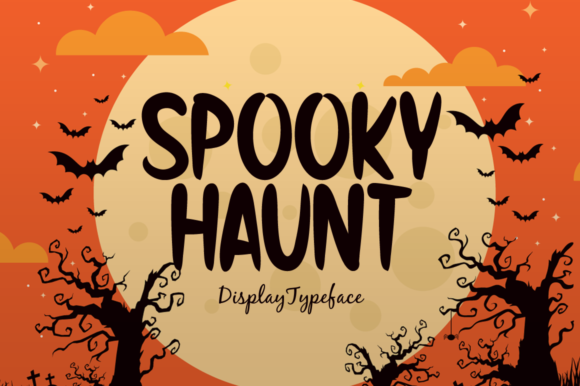
Spooky Haunt is a charming and casual display font that brings a touch of Halloween magic to any creative project. Designed with playful curves, whimsical shapes, and a slightly spooky aesthetic, it’s perfect for seasonal events, themed branding, or just adding a fun twist to your designs. Whether you're creating marketing materials, social media posts, or holiday cards, Spooky Haunt can elevate your visual storytelling in ways you might not expect.
Why Spooky Haunt Appeals to Creatives
Fonts like Spooky Haunt are more than just decorative elements—they’re tools that shape how your message is received. The Halloween theme makes it especially appealing for content related to fall festivals, costume parties, haunted houses, and even seasonal promotions. Its casual style ensures readability while still making a bold impression, striking the right balance between fun and professionalism.
However, many creators overlook important details when choosing and using fonts like Spooky Haunt. These oversights can lead to poor design choices, miscommunication of tone, or even reduced engagement from your audience.
Common Mistakes When Using Spooky Haunt
- Overusing the font: While Spooky Haunt adds charm, using it too much can make your design look cluttered or unprofessional. Reserve it for headlines or key phrases instead of applying it to every text element.
- Ignoring legibility: Some versions of Spooky Haunt may have stylized letters that are harder to read at smaller sizes. Always test how it looks on different platforms and devices before finalizing your design.
- Mismatching with other fonts: Pairing Spooky Haunt with overly formal or modern fonts can create a jarring contrast. Choose complementary fonts that share similar aesthetics or maintain a cohesive visual identity.
- Not checking licensing: Before downloading or purchasing Spooky Haunt, ensure you understand the usage rights. Some fonts require attribution or are only suitable for personal use, which can cause legal issues if used commercially without permission.
How to Use Spooky Haunt Effectively
To get the most out of Spooky Haunt, consider the context in which you're using it. For example, if you're designing a Halloween flyer, pairing Spooky Haunt with a dark background and complementary colors like orange or purple can enhance its spooky appeal. On the other hand, if you're using it for a brand logo, be cautious—while it's great for seasonal campaigns, it may not be appropriate for year-round branding unless it aligns with your overall aesthetic.
A good approach is to use Spooky Haunt as a focal point rather than a background element. This means applying it to headings, titles, or call-to-action buttons where it can grab attention without overwhelming the rest of the content.
What to Check Before Using Spooky Haunt
- Font Compatibility: Ensure Spooky Haunt works well across different operating systems and browsers. Some fonts may render differently depending on the platform, which could affect your design's consistency.
- Color Contrast: Test Spooky Haunt against various color backgrounds to ensure it remains legible. Poor contrast can make your text difficult to read, especially for users with visual impairments.
- File Format: Download Spooky Haunt in the correct format (e.g., TTF, OTF, WOFF) based on your design software or website requirements. Using the wrong file type may prevent the font from displaying correctly.
- Usage Rights: Review the license agreement carefully to avoid copyright violations. If you're unsure about the terms, consult a legal expert or choose a font with a clear, permissive license.
Real-World Examples of Spooky Haunt in Action
Let’s say you're running a small business that sells Halloween costumes. By using Spooky Haunt for your product names and promotional banners, you instantly communicate a fun and festive vibe. However, if you apply the same font to your pricing table or contact information, it might confuse customers who are looking for clarity and professionalism.
Another example is a blogger writing about autumn traditions. Spooky Haunt can be used in the blog title or featured image text to set the tone, but keeping the body text in a simpler, more readable font ensures that the content remains easy to digest.
Alternatives and Complementary Fonts
If Spooky Haunt doesn’t quite fit your needs, there are several alternatives that offer a similar Halloween feel. Fonts like Haunted House, Scary Halloween, or Pumpkin Spice provide variations in style and character that might better suit your specific project. Experimenting with these options can help you find the perfect match for your creative vision.
For a more balanced look, pair Spooky Haunt with a sans-serif font like Arial or Helvetica for body text. This combination maintains readability while allowing Spooky Haunt to shine in the more prominent areas of your design.
Final Tips for Choosing and Using Spooky Haunt
Spooky Haunt is a versatile and eye-catching font that can add a unique flair to your creative work. But like any design tool, it requires thoughtful application. Avoid overuse, check compatibility and licensing, and always prioritize readability and clarity.
By making informed choices and staying mindful of best practices, you can use Spooky Haunt effectively to enhance your projects without falling into common pitfalls. Whether you're a beginner or an experienced designer, taking the time to understand how fonts impact your work can lead to better results and greater satisfaction in your creative process.